Time Blocking Printable Template: Your Ultimate Planner Guide
Most productivity tools promise a lot but deliver generic layouts that don’t quite fit how you actually work. A Time Blocking Printable Template changes that completely. It gives you a structured yet flexible starting point for designing daily schedules, weekly planners, or full-blown time management journals. Whether you sketch out your day in 15‑minute increments or prefer a broader morning/afternoon/evening split, the right template makes the process feel less like a chore and more like a ritual you look forward to.
What sets this particular resource apart is that it’s not just a single-page PDF. You get a full book‑ready interior file set, built with professional printing standards in mind. That means you can take your time blocking layouts, add your own branding, and turn them into a physical planner, a paperback workbook, or even a sellable product on Amazon KDP. The design language leans toward clean modern typography without being cold or sterile. There’s a subtle warmth in the way the lines, spacing, and header placements invite you to write — almost like the page is gently nudging you to stay accountable.
What Makes This Printable Template Different
I’ve tested plenty of planner templates over the years, and many of them fall apart once you try to print them professionally. Margins get chopped, gutter space disappears, and the whole layout loses its rhythm. This Time Blocking Printable Template package solves that by including a proper safety margin for hole punching and binding. So if you’re a stationery lover who wants to toss pages into a disc‑bound system or a six‑ring binder, everything aligns perfectly. No more trimmed headers or misaligned time slots.
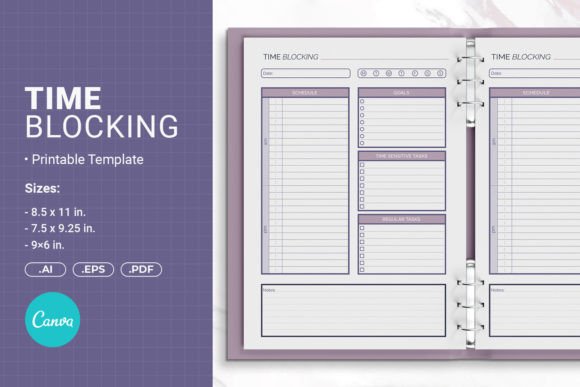
The template ships in three distinct trim sizes, which is surprisingly rare. You can pick the format that suits your audience or your personal preference without manually resizing everything and hoping the proportions hold. And because it’s fully editable in Adobe Illustrator, you aren’t locked into someone else’s aesthetic. Change the font, move the time blocks, adjust the contrast — the raw vector files let you treat each element as a design asset rather than a rigid framework.
Clean Typography That Supports Focus
Time blocking only works when the visual hierarchy is crystal clear. You need to immediately see where the hours go, what the priority tasks are, and which notes belong to a specific day. This template uses a smart combination of a sans serif font for section headers and a slightly lighter weight for the body labels. The contrast between bold hour markers and subdued minute guides prevents eye strain while still keeping your schedule scannable. It’s the kind of subtle modern typography decision that separates a professional planner from a spreadsheet printout.
You’ll notice that the primary typeface carries a friendly, approachable character — think somewhere between a humanist sans and a clean geometric. That balance matters more than most people realize. A purely mechanical grid can feel oppressive, while an overly decorative script would mess with the precision that time blocking demands. Here, the typeface choice hits a sweet spot: it communicates structure without shouting, and it leaves enough breathing room for your own handwriting to coexist naturally.
Three Size Options for Different Use Cases
One of the smartest things about this bundle is the inclusion of multiple dimensions. You get:
- 8.5 x 11 inches (215.9 x 279.4 mm) — a standard letter size that works beautifully as a desk pad or a printable you can spiral‑bind at a local shop. Plenty of room for detailed hourly breakdowns and side‑note columns.
- 7.5 x 9.25 inches (190.5 x 234.95 mm) — a slightly smaller format that feels more like a trade paperback planner. It’s portable but still generous enough for daily scheduling.
- 6 x 9 inches (152.4 x 228.6 mm) — a compact, journal‑sized option that slips into a bag. Perfect for on‑the‑go entrepreneurs, students, or anyone who prefers a minimalist approach to daily planning.
Having these ready‑to‑go means you can prototype a full planner book, get a test print, and see how the proportions translate from screen to paper. If you’re designing a product to sell, offering multiple sizes stops you from limiting your customer base to just one preference.
Who Gets the Most Value From This Resource
I’d recommend this to anyone who creates physical planners, sells printable stationery on Etsy, or runs a small coaching business where custom workbooks are part of the deal. For self‑publishing authors, the Time Blocking Printable Template plugs directly into the Amazon KDP workflow. The included PDF comes in the correct format with bleed, so you don’t have to wrestle with KDP’s often‑fussy interior checker. Upload, preview, and you’re good to go.
Content creators who build “plan with me” audiences will appreciate the editable Canva link. You can drop in your own color palette, swap out the accent shapes, and create fresh seasonal variants without opening a heavy design tool. Marketers and brand strategists can use these pages as lead magnets — a beautiful printable that genuinely helps people manage their time also quietly reinforces your visual identity. Every time someone uses a page, they’re interacting with your brand’s design language, which is far more effective than a logo‑slapped PDF checklist.
Customizing Without Losing Professional Polish
I always suggest starting with small, intentional tweaks rather than overhauling everything. Keep the core structure — the time column, the priority section, the notes area — and adjust only the visual wrapping that reflects your brand identity. Switch the header font to a serif font if your brand feels more editorial and classic. Swap the line color to a subtle brand accent. Add a faint watermark or a small logo mark in the footer.
One thing I’ve learned from designing planner interiors: don’t overcrowd the page. It’s tempting to fill every inch with trackers, water intake reminders, and gratitude prompts, but time blocking demands negative space. The template already respects that principle — the margins are intentional, and the layout avoids clutter. When you customize, try to protect that breathing room. A well‑rested eye tracks time more effectively than one that’s overwhelmed by visual noise.
Font Pairing and Readability Considerations
If you decide to modify the typefaces inside the Illustrator or Canva files, pay attention to font pairing dynamics. The current setup likely pairs a clear sans with a slightly warmer secondary style for notes and captions. If you swap in a script font or a handwritten font for section headers, scale it carefully — too large and it loses the quick‑read advantage, too small and it becomes illegible against the grid lines.
For readability at a glance, which is what time blocking thrives on, I stick to fonts with open apertures and distinct character shapes. Avoid condensed families for the main body if you’re targeting older audiences who might fill out these pages in less‑than‑ideal lighting. A display font might look fantastic on a cover or a section divider, but inside the daily spreads, let the numerals and time labels do the heavy lifting with a reliable workhorse typeface.
Real‑World Ways to Use This Template
Beyond the obvious daily planner, I’ve seen creative applications that never would have occurred to me at first. A project manager I know repurposed the weekly spread as a sprint tracker for a small development team, printing large 11‑inch sheets and sticking them on a whiteboard. A teacher turned the daily layout into a homeschool schedule, color‑coding subject blocks with highlighter tape. And a stationery designer used the 6×9 format to build a small run of “focus journals” she sold at a local craft fair — they sold out in two days.
If you’re in the packaging design or editorial design space, think about how these structured layouts could inspire other grid‑based projects. The consistent ratio between header blocks, time cells, and note columns shares a lot of DNA with well‑designed magazine layouts or brochure spreads. Borrowing that rhythm for a lookbook, an event program, or a training workbook can give everything a cohesive, intentional feel.
Preparing for Print and Digital Distribution
Since the package includes an EPS file and a ready‑to‑upload KDP PDF, you can produce a polished hard copy without hiring a formatter. If you’ve never uploaded to KDP before, the bleed setting is already baked in — that 0.125‑inch extra margin ensures that any background color or border extends cleanly to the page edge after trimming. For binder printing, use the standard letter size and ask your print shop to hole‑punch along the indicated safe zone. I’ve done this with a local print service and the results looked indistinguishable from store‑bought planners.
For digital distribution, the editable Canva link and AI files mean you can export individual pages as high‑res JPGs or PNGs for app‑based planners like GoodNotes or Notability. Many users love importing daily sheets into their tablet and time blocking with a stylus. The clean grid lines and intuitive hierarchy carry over beautifully to a screen, especially if you keep the background a soft off‑white to reduce glare.
A Small Note on Licensing and Commercial Use
I always double‑check what’s allowed before I build a product around someone else’s template. With this one, the inclusion of open‑source AI Illustrator files and the clear mention of Amazon KDP usage suggests a generous commercial license. You can print and sell the final planners you create, bundle them in your own digital packages, and even modify the internal design to match seasonal themes. As with any commercial font or design asset, if you swap in new typefaces, verify that those fonts are properly licensed for embedding and print distribution. That one step saves a headache later.
The template removes the technical friction around layout and measurements, so you can focus on what actually matters: helping people reclaim their time. Whether you create a single copy for your desk, a small batch for a client gift, or a full product line for your online shop, you’re starting from a solid foundation that’s already been stress‑tested for real‑world printing. And in a market saturated with sloppy, misaligned printables, that attention to detail genuinely sets your work apart.