Lined Notepad: A Ready-Made Template for Notebook Projects
For anyone building a low-content book or a custom writing journal, starting from a blank page can be slower than it needs to be. A pre-structured lined notepad template removes that friction. This particular resource arrives as a full interior file, prepared specifically for Amazon KDP and other print-on-demand platforms. It cuts down repetitive formatting work and gives you a clean, professional backbone for notebooks meant for daily notes, journaling, or creative writing. What makes it worth a closer look is the combination of editability, format range, and a page count that fits many common notebook concepts.
What You Actually Get with This Lined Notepad Resource
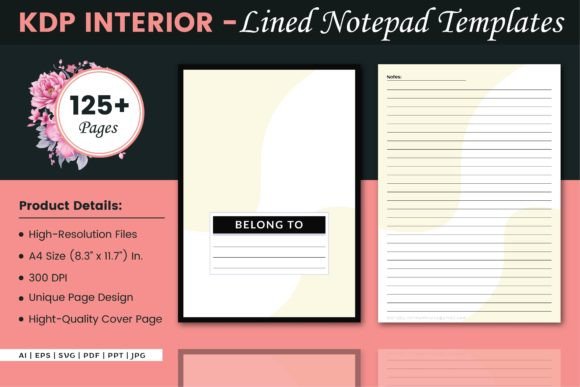
The core download is not just a single static PDF. It’s a collection of complementary file types, each serving a different use case. Inside, you’ll find an A4-sized interior (8.3″ × 11.7″) set up with 125 lined pages. No bleed is applied to the interior, which simplifies the technical side of KDP uploads and avoids headaches around trim edges.
The included formats broaden usability well beyond one-click publishing:
- AI (Adobe Illustrator) – A fully editable vector source file. You can recolor lines, adjust ruling height, add page numbers, or remove pages without losing resolution.
- EPS – Another editable vector format that imports cleanly into older design software or alternative vector programs like Affinity Designer or CorelDRAW.
- SVG – Lightweight, scalable, and ideal for web previews or quick modifications without full design suite overhead.
- PDF – The print-ready file. Optimized for direct upload to KDP, it reduces the risk of rejection due to formatting errors.
- PPT (PowerPoint) – An underrated format for those who prefer rapid layout tweaks in an interface they already know. Good for adding headers or visual notes before exporting to PDF.
- JPG – High-resolution image files of the interior pages, useful for mockups, previews, or promotional material for your finished notebook listing.
An extra cover page file is also part of the package, so you aren’t left scrambling for a matching cover template. Having all these options makes the lined notepad asset more of a starter kit than a single-use download.
How the Lined Notepad Meets Practical Publishing Needs
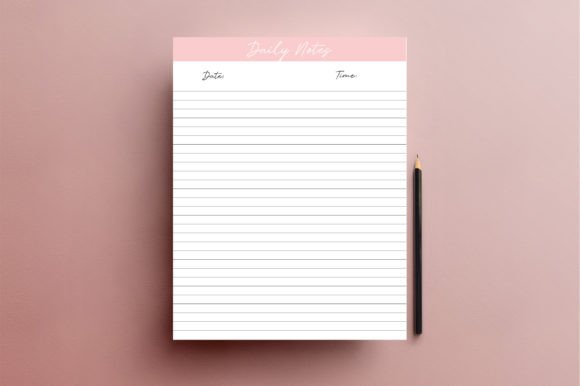
Many creators underestimate how much time goes into ensuring every ruled line sits perfectly straight, that the line weight prints consistently, and that margins stay uniform across 125 pages. This template has already solved those mechanical concerns. The lines are evenly spaced, and because the source files are vector-based, you maintain crisp edges when scaling or converting to other sizes—though the default A4 dimension is a deliberate choice worth examining.
The A4 proportion aligns well with school stationery, professional notebooks, and many international markets outside the United States. If your target buyer prefers US Letter (8.5″ × 11″), you’ll want to resize the interior using the AI or EPS file. Because it’s a no-bleed layout, you don’t have to worry about elements getting cut off during resizing. The absence of bleed also keeps the interior clean: no artwork, no headers, no footers—just a pure lined notepad appearance that you can leave as-is or enrich with your own branding.
Uploading the PDF to KDP is straightforward. Since it’s pre-formatted with margins that consider standard binding requirements, you’re far less likely to encounter content-cutoff warnings. For those printing at home or using a local print shop, the same PDF produces consistent results, and any of the editable formats let you output a new PDF with your own tweaks applied.
Design Quality and Customization Potential
At a technical level, the template’s high-resolution interiors keep rules sharp—no fuzzy edges when printed at 300 DPI or higher. That matters especially for notebooks users write in by hand; poorly rendered lines can look unprofessional and cheapen the feel of the entire product. Here, the linework is thin, subtle, and evenly gray, which stays present but doesn’t distract from handwriting.
The true value, however, sits in the editable source files. You aren’t locked into a single color scheme. Need a dark-mode notebook with white lines on black paper? Tweak the AI file. Want to add a subtle dot grid background behind the lines for hybrid use? Overlay a grid pattern. Changed your mind about the page count? Duplicate or delete pages in Illustrator before exporting a revised PDF. This transforms a simple lined notepad template into a malleable resource that adapts to multiple product ideas without starting over.
Consistency across all 125 pages is another important factor. Manually building a notebook interior often introduces small alignment shifts, especially when copying and pasting between documents. The template eliminates that drift. Every page matches, which translates directly into a more polished final product—and fewer returns from detail-oriented customers.
Who Stands to Benefit Most from a Pre-Formatted Lined Notepad
This template naturally suits self-publishers who focus on low-content books. If you already sell journals, composition notebooks, or writing pads on Amazon KDP, you understand how a ready-to-upload interior accelerates your workflow. Instead of recreating a lined layout from scratch, you can concentrate on cover design, niche keyword research, and listing optimization.
Educational content creators and coaches also find value here. You might insert guided prompts between the lined pages, export a new PDF, and offer it as a downloadable companion to an online course. Because the original file is editable, you aren’t limited to a pure ruled notepad; you can interleave instructional pages while keeping the writing sections intact. The PowerPoint version makes this especially accessible for those who aren’t comfortable with advanced vector software.
Stationery designers who sell physical products on Etsy or at craft fairs can treat the template as a base layer. Add floral flourishes, inspirational quotes, or custom watermarking in Illustrator, then print locally. The 125-page count hits a sweet spot for thin yet substantial notebooks that keep shipping weight manageable. Graphic designers building client mockups also appreciate the JPG and SVG versions for quick visual presentations before committing to a full layout.
Even solo professionals—coaches, consultants, workshop leaders—may use it to produce private-branded notebooks for client events or team retreats. The presence of an editable vector file means a logo or tagline can be discreetly placed in the header or footer without breaking line consistency.
Points to Keep in Mind Before Using This Template
No asset is perfect for every scenario. A few practical considerations help set realistic expectations.
Page count flexibility. 125 pages works well for many standard notebooks, but if your ideal product requires exactly 120, 150, or 200 pages, you’ll need to adjust the file. The AI and EPS formats make this possible, but it still demands some comfort with design software. If you’re working solely from the PDF, you’re locked into 125 pages.
A4 orientation and sizing. While A4 is standard globally, US-based buyers often look for 8.5″ × 11″ notebooks. Resizing can introduce minuscule line spacing changes if not done proportionally, so test prints are wise. That said, keeping the A4 format works perfectly for those targeting European, Australian, and many Asian markets where A4 stationery is the norm.
No-bleed simplicity. The no-bleed interior is reliable, but it also means you can’t have colorful margins that extend to the edge of the page. If your notebook concept relies on full-edge tinted paper or decorative border patterns that bleed, you’ll either need to adapt the design or start with a different template base. However, for straightforward writing journals, this limitation is irrelevant.
Line style is fixed yet editable. The default line spacing and weight suit general handwriting, but if you plan a notebook for young children needing wider ruling or for dense note-taking requiring narrower lines, you’ll have to manually adjust the spacing in the AI or EPS file. The template isn’t infinitely variable with a single click, but the vector nature means those modifications are entirely feasible with a bit of effort.
Cover design responsibility. The extra cover page file is a helpful starting point, but a compelling cover still falls to you. This lined notepad kit provides the interior; your market differentiation will come from how you package it visually and position it within a niche.
Long-Term Value and Reusability
Once you purchase or acquire this template, it becomes a reusable foundation. You can generate multiple notebook interiors from the same file collection—one with margins, one without; one with dated headers for a daily journal, another with a simple clean layout. Because you hold editable source files, the asset doesn’t expire after a single book launch. That reuse model lowers the cost-per-product significantly for serial publishers building a catalog of related stationery items.
The format diversity also future-proofs your access. Even if you switch design tools over time, having both AI and EPS ensures broad compatibility. The SVG and JPG versions support less traditional uses, like embedding pages into a Notion template or creating digital writing practice sheets for tablets. That versatility extends the template’s lifespan beyond print alone.
Making an Informed Choice About This Lined Notepad Template
This resource earns its place when you need a dependable, high-resolution lined interior that works out of the box but doesn’t lock you into cookie-cutter repetition. It strikes a careful balance between done-for-you convenience and customizable depth. The 125-page, A4, no-bleed structure fits the core requirements of serious notebook publishers, while the editable AI and EPS files open the door for graphic designers and stationery creators who want to make the template their own.
If your goal is to publish a simple, well-built writing journal quickly—without starting from a blank page or fighting alignment issues—this lined notepad package removes unnecessary technical friction. On the other hand, if you need a fully unique interior with hand-drawn elements or very specific page sizes, you may outgrow it. But for the majority of professionals, entrepreneurs, and creators entering the low-content space or refreshing their lineup, the template functions as a practical, time-saving tool that quietly handles the details so you can focus on branding and market fit.