Addition and Subtraction Volume-381: A Practical Guide for Creating Professional Math Workbooks
Many low-content publishers, educators, and small business owners discover Addition and Subtraction Volume-381 and immediately see its appeal. It’s a ready-to-use KDP interior—100 pages, 8.5 by 11 inches, with a clean mix of addition and subtraction exercises, and all answers included. On the surface it looks like a straightforward shortcut to launching a math workbook on Amazon. But how you handle that interior file before hitting “publish” makes all the difference between a product that earns positive reviews and one that gets returned or ignored.
Too often, people download a ready-made interior and treat it as a finished book. They miss small but critical details that affect print quality, usability for the end user, and overall perceived value. This article isn’t a dry product description. Instead, it walks through real patterns I’ve seen—mistakes that even experienced creators make—and shows you how to avoid them when working with Addition and Subtraction Volume-381. You’ll also learn what to double-check before you invest time, money, or both.
What Exactly Is Addition and Subtraction Volume-381?
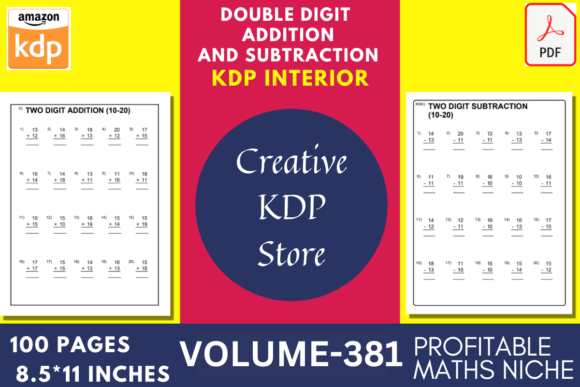
Let’s clarify what you actually get. This is a 100-page PDF source file designed specifically for Kindle Direct Publishing interiors. The page size is 8.5 x 11 inches, no bleed. It contains 50 pages of addition problems and 50 pages of subtraction problems. The numbers in the exercises range from 10 to 99—no single-digit fluff. Crucially, answers are included at the back, which many buyers overlook during a quick scan. The file is high resolution, print-ready, and set up to avoid common formatting headaches when you upload to KDP.
For someone selling educational workbooks, homeschooling content, or supplementary math practice, this volume removes the need to design pages from scratch. But convenience can become a trap if you assume everything is automatically perfect for your specific audience.
Mistake 1: Assuming the Problem Range Matches Every Child’s Level
One of the most frequent misunderstandings about Addition and Subtraction Volume-381 is the numerical range. The title clearly states addition and subtraction with numbers 10–99, yet I’ve seen publishers market the resulting workbook for kindergarten or first grade. If you place addition of 87 + 46 in front of a five-year-old who is still grasping number bonds to 10, the customer will feel confused—and possibly frustrated enough to leave a critical review.
This mismatch affects not only star ratings but also your book’s discoverability. Amazon’s algorithm weights customer satisfaction signals. When a parent buys a workbook labeled “ages 4–6” and finds problems suited for second or third graders, they may return it. That triggers poor conversion metrics and can push your book down in search results.
Better approach: Before finalizing your cover or title, work through a few randomly selected pages. Determine the average difficulty level honestly. Is the content best for children who have already mastered basic two-digit addition without regrouping? Does the subtraction section require borrowing? Use that assessment to decide your target grade level—likely around Grades 2–3 or even early Grade 4 for review. Clearly state the intended age range and problem types in your book description. This upfront honesty builds trust and reduces returns.
Mistake 2: Ignoring the No-Bleed Specification
The product description for Volume-381 says “no bleed,” and people often breeze past this. With KDP, a no-bleed interior means all content must sit comfortably within the trim margins. If your cover design doesn’t match that interior trim size (8.5 x 11 inches), or if you later decide to scale the interior to another trim size like 8 x 10, you can introduce formatting errors. Content that looked centered on the original file may shift, and page numbers might drift too close to the edge.
The practical impact: copies print with lopsided layouts or text cut off at the spine. This leads to quick dissatisfaction. Even if the problems are mathematically correct, the visual sloppiness makes the workbook feel amateurish. And in a competitive niche like math workbooks, presentation matters enormously.
Better approach: Keep the interior exactly as supplied. Do not resize or change the page dimensions unless you fully understand how to adjust margins and content layout. If you must modify it, test-print a single page at your local print shop and lay it next to the original. Check alignment, margin consistency, and whether any gray areas appear near the binding edge. For most creators, sticking with the native 8.5 x 11 inches is the safest route.
Mistake 3: Duplicating or Misusing the Answer Section
A surprising number of people don’t scroll to the end of the PDF before they begin compiling their workbook. Addition and Subtraction Volume-381 already includes answers. When a hurried publisher adds their own answer key at the end—or worse, reorders the pages and accidentally moves the answer section to the middle—the final product becomes messy. Users might find answers directly after every problem page, defeating the purpose of an exercise book, or they might get two different answer keys that confuse children and parents.
Another variant: you decide to remove the answers to save a few pages. That’s fine if you intend a practice-only workbook, but you must clearly communicate that omission. Otherwise, the customer who expects a complete resource feels shortchanged.
Better approach: Open the full PDF and review the entire page sequence before you upload to KDP. Note where the answer section starts and ends. If you want to separate the answers into a removable booklet or sell a version without answers, ensure your product title and description reflect that. Consider leaving the answers as is, because many buyers specifically search for “math workbook with answers included,” which can be a unique selling point.
Mistake 4: Underestimating Print File Settings
Having a high-resolution PDF is great, but the way you export or process the file before uploading to KDP can degrade quality. Some creators open the source file in an image editor, accidentally compress the pages, and then wonder why the print version looks pixelated. Others use online converters that alter the color profile or embed fonts poorly. The phrase “ready to print” refers to the file you receive—not necessarily the file you’ll upload after heavy tinkering.
Low-quality print output frustrates customers who expect crisp numbers and clear formatting. Faint, jagged numerals are especially problematic for young learners still developing visual discrimination. They might misread 67 as 87, leading to unnecessary errors and diminished learning value.
Better approach: If you only need the interior as is, upload the original PDF directly to KDP. Don’t open and re-save it unless you must make a deliberate, controlled edit. If you do edit, use a proper tool like Adobe Acrobat or similar, and verify that the export resolution stays at 300 DPI or higher. After uploading to your KDP dashboard, use the online previewer to flip through the entire book, zooming into random pages to check sharpness.
What to Check Before You Commit or Publish
Beyond avoiding these specific mistakes, there are a few universal checks that can save you time and money. Whether you’re a marketer creating a lead magnet, a teacher building classroom resources, or a KDP beginner hoping for passive income, blunt honesty at this stage prevents disappointment.
- Page count perception: 100 pages sounds ample, but remember that includes 50 addition and 50 subtraction exercise pages. Some pages might be intro, instruction, or answer pages. Verify the actual count of problem pages to set accurate customer expectations in your description.
- Interior file type: The source is a PDF, not an editable Word document. If you want to change fonts, add branding, or insert a name-collecting page, you’ll need a PDF editor. Factor that into your workflow plan.
- Color mode: For a math workbook, black and white interior is standard and cost-effective. Confirm that the PDF is set to grayscale or pure black text. Color content can raise printing costs unexpectedly if you choose premium color printing by mistake.
- Front matter: Does the file include a title page, copyright page, or instruction sheet? If not, you may want to add one. But if you add it clumsily, you might break the pagination or push the answers onto odd-numbered pages, causing layout issues. Carefully insert extra pages before the first exercise if needed.
- Your own market research: Search Amazon for similar workbooks. See what competitors in the “math drills” and “addition subtraction 2nd grade” categories are offering. If most feature colorful illustrations or perforated pages, a straightforward black-and-white interior still works—but you need to price and position it accordingly.
Realistic Scenarios and Smarter Solutions
Let’s say you’re a freelancer who bought Addition and Subtraction Volume-381 to create a workbook for a client. You personalize the cover, add the client’s logo, and send a printed proof. The client replies that the problems are too difficult for the target age group. You didn’t check the number range. Now you’ve wasted a proof copy and lost trust. A better path: before ordering the proof, send the client five sample pages and ask them to confirm difficulty and formatting. This small step prevents a larger setback.
Or imagine you’re a blogger selling educational printables. You upload this interior to a print-on-demand platform, but you set the trim size to A4 instead of US Letter. The platform automatically scales the content, and the margins become inconsistent. The fix: match the trim size exactly to the PDF’s dimensions. 8.5 x 11 inches is US Letter, not A4, so configure your project accordingly. If you absolutely need A4, you’ll need to adjust margins site by site—a tedious but necessary task.
Another scenario: a KDP publisher rushes to launch without reviewing the answer section. A parent buys the book, finds an error in the answer key, and leaves a one-star rating. The error might have existed in the original file or crept in during editing. Even if the source file is accurate, you are responsible for the final product. Always spot-check at least ten random answers against your own manual calculation. It’s extra work, but it safeguards your reputation.
Turning a Good Interior into a Great Product
A ready-made interior like Addition and Subtraction Volume-381 saves you hours of design work. The real magic happens when you treat it as a foundation rather than a finished masterpiece. Layer on thoughtful details: a clear subtitle, a brief instructions page written in parent-friendly language, a completion certificate at the end, or a link to a related freebie if you’re building an email list.
Focus on the user experience. The child solving 34 + 57 isn’t thinking about your workflow. They need space to write, legible numbers, and a sense of progress. The parent wants satisfying page flipping and obvious organization. If you respect those two priorities, the technical specifications of the file—no bleed, high resolution, correct trim size—do their job silently in the background.
For entrepreneurs and small business owners, this volume can be the starting point of a series. Pair it with a multiplication and division counterpart, or create a themed bundle. But each time you expand, revisit the lessons learned here. Recheck the number range for consistency, verify the answer key, test the print quality, and never assume the next interior will behave identically.
When you sidestep the common traps, Addition and Subtraction Volume-381 becomes more than a file. It transforms into a reliable, professional-looking resource that genuinely helps kids practice math—and a product you can stand behind with confidence.