Letter and Number Tracing Book for KDP-3
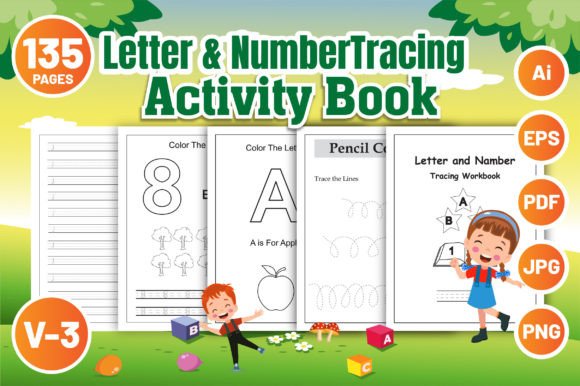
Putting together a children’s activity book that feels professionally crafted while remaining practical can eat up hours of design time. The Letter and Number Tracing Book for KDP-3 is a ready-to-publish interior file package that solves this directly. It gives you uppercase A-Z, lowercase a-z, and number 0-9 tracing pages across 135 pages, pre-formatted for 8.5″ x 11″ with no bleed. The download includes fully editable AI and EPS files, plus standard PNG, JPG, and PDF versions, so you can move from download to upload with minimal friction.
At first glance, this might look like a simple set of worksheets. But the way a kindergarten teacher, a KDP publisher, a freelance graphic designer, or a parent running a small side business views this product differs quite a bit. Their priorities around ease of use, flexibility, and long-term value shape what they look for in a resource like this. Let’s unpack what’s actually inside and how it might fit different hands-on goals.
What’s Inside the Letter and Number Tracing Book for KDP-3
The file structure itself tells you a lot about the intended workflow. You receive a high-resolution AI file, an EPS file, a ready-to-print PDF, and a collection of PNG and JPG images. That mix is intentional. The editable vector formats give you full control over typography, stroke weight, and layout, while the raster and PDF options let you skip directly to printing or upload.
The interior pages are organized into three clear sections:
- Uppercase Letter Tracing A-Z – each letter presented with directional arrows and plenty of practice rows.
- Lowercase Letter Tracing a-z – mirroring the same clean layout, reinforcing fine motor patterns.
- Number Tracing 0-9 – digits are paired with simple counting cues to connect numeral and quantity.
The entire document is 135 pages, which feels generous without being bloated. That page count works well for KDP’s print pricing sweet spot, especially for paperback interiors. Because the file is designed with no bleed, you don’t have to worry about trimming safety or prepping complex margins before submission.
Who Benefits Most from This Tracing Activity Book?
Different people approach a tracing book file like this from entirely different angles. Understanding those angles helps you decide if this fits your current project or workflow.
Self-publishers using Amazon KDP often need speed and print-readiness. For them, the Letter and Number Tracing Book for KDP-3 is almost a plug-and-play solution. The PDF can go straight to the KDP dashboard, and the lack of bleed eliminates one of the most common rejection reasons. When you’re publishing multiple low-content books every month, this kind of reliability saves real time and nervous energy.
Teachers and early childhood educators typically value the learning sequence and visual clarity. Here, the tracing progression from uppercase to lowercase to numbers follows a natural handwriting readiness path. A preschool teacher might not care about the AI file at all but will appreciate that the letter formation uses standardized, easy-to-read fonts and includes directional cues that align with most handwriting programs.
Graphic designers and freelance creators often land on the opposite end of the spectrum. They grab the fully editable AI or EPS file and treat the original layout as a starting point. Maybe they want to swap in a cursive-friendly font, add a character mascot, or extend the number section up to 20. For them, customization capability is the main draw—the provided PNGs are just bonuses.
Parents or hobbyists who want a high-quality printable at home will likely use the PDF or PNG files. They might print individual pages for weekend practice, laminate a few sheets for a dry-erase binder, or assemble a personalized workbook for a child who needs extra repetition. The fact that they don’t need design software lowers the barrier significantly.
Using the Download Files for Different Projects
Because you get multiple formats, the project type often dictates which file becomes your daily workhorse. Here are a few paths based on common scenarios:
- Direct KDP upload: Use the provided PDF as is. No bleed means you can set your KDP cover accordingly with a full-wrap that matches the 8.5×11 trim size. The 135-page interior counts toward a standard book spine calculation.
- Classroom resource creation: Print from the PDF or insert JPG pages into a slideshow app to project tracing strokes on a whiteboard. Some teachers use the PNG files to create custom Seesaw or Google Classroom activities.
- Branded workbook series: Open the AI file, adjust the color palette, embed a logo at the bottom of each page, and duplicate patterns. Because the vectors are editable, you can apply these changes globally without reconstructing the layout.
- Combining with other activity books: A publisher might pull the number tracing pages into a larger math activity bundle. Since the pages are clean and isolated, they merge well with other interiors without clashing styles.
Editing and Customization: Beyond Ready-to-Print
The high-resolution AI and EPS files put full creative control in your hands, but that doesn’t mean you must be an Adobe Illustrator expert. Even simple edits can make the end product feel more tailored.
Some users adjust line thickness for younger toddlers who need thicker strokes. Others replace the arrow indicators with numbered directional dots to match a specific curriculum. Because the layers are likely organized logically (though file structure can vary), you can often hide or show elements without rebuilding everything from scratch. If you’re a beginner in vector editing, start with small tweaks—change the header font, add a “This book belongs to” page, or insert a blank practice page between letters. These quick modifications can raise the perceived value of a KDP book without requiring advanced skills.
Another practical edit is splitting the content into multiple smaller books. You might extract just the uppercase tracing pages for a focused beginner alphabet book, or isolate the number 0-9 section for a slim counting booklet. The ability to pull sections apart lets you serve narrower customer segments, like parents of three-year-olds who aren’t ready for the full 135 pages yet.
Why the 8.5×11 No-Bleed Format Matters
Interior bleed seems like a technical detail until you’ve dealt with KDP’s automated file check. A no-bleed specification means every part of the design sits comfortably inside the trim area. There are no edges to lose, no awkward white slivers from miscalculated margins. This is especially important for tracing books because kids need the full practice area visible, not partially clipped off.
The 8.5″ x 11″ size is standard across many markets, so buyers know what to expect. It’s large enough for little hands without being floppy, and it plays well with most home printers. From a manufacturing cost perspective, this trim size keeps printing charges predictable, which matters when you’re pricing a KDP paperback competitively.
From Beginner to Pro: Matching the Tool to Your Skill Level
If you’ve never created a KDP interior before, the ready-to-print PDF route feels like a safety net. You don’t need to understand bleed settings, margin guides, or embedding fonts. Just download, check the previewer, and publish. This low-friction entry point is one reason a tracing book file like this is popular among people testing the waters of low-content publishing.
More seasoned creators often evaluate the source files differently. They’ll look at how clean the vector paths are, whether fonts are outlined properly, and how easy it is to repurpose the layout without breaking elements. The presence of an EPS file signals a compatibility layer for older or more specialized software, which matters in professional print workflows. These users might not care that a PDF is included; they’re looking at the quality of the foundational design they can build upon.
Teachers and parents fall somewhere in between. They may not be editing vectors, but they do care about the learning sequence, the accuracy of the letter formation, and whether the pages hold a child’s attention. A tracing page with too much visual noise can overwhelm a young learner, so the clean, repetitive structure here actually serves a pedagogical purpose. That simplicity is often what keeps kids on task.
Practical Examples for Every Type of User
Let’s make these usage paths concrete. A work-at-home parent who’s dabbling in KDP decides to launch their first activity book. They download the Letter and Number Tracing Book for KDP-3, upload the PDF, design a simple cover in Canva with matching dimensions, and publish within a weekend. They didn’t touch Illustrator, didn’t edit a single file, and still got a professional-looking product live.
Meanwhile, a kindergarten teacher uses the PNG files to build a digital tracing station on a tablet. She imports the images into a drawing app where children can trace directly on the screen with a stylus. The high-resolution artwork means the letters don’t pixelate when zoomed in, which keeps the activity comfortable for developing eyes.
On the other side, a freelance illustrator wants to create a branded line of early learning books. She opens the AI file, changes the basic sans-serif letters to a handwriting font with exit strokes, and adds her own illustrated animal characters beside each letter. The core structure stays intact so she doesn’t rebuild the entire 135-page layout from scratch. The time she saves becomes her margin.
A small business owner running a print-on-demand shop might slice the tracing book into three separate products—uppercase only, lowercase only, and numbers only—to test which sells best. Because the source files are editable, they can generate these split variants in an afternoon.
Making an Informed Choice for Your Needs
Not every resource fits every person, and that’s okay. The Letter and Number Tracing Book for KDP-3 prioritizes a clean, ready-to-use layout with enough editing flexibility to satisfy a range of users. If your top concern is opening a file and having it work immediately, the PDF path is refreshingly straightforward. If you need deep customization, the AI and EPS versions give you the bones of a solid interior without demanding you draft letterforms from scratch. If you’re somewhere between those poles—an educator preparing classroom materials or a parent building a personalized handwriting binder—the PNG and JPG options slot neatly into your existing toolkit.
What makes one person pick this over building every page manually often comes down to how they value time versus control. The more comfortable you are with design software, the more you might lean into tweaking and branding. The less time you have, the more you’ll value that the file meets KDP’s technical specs and includes a complete tracing sequence. Both paths are valid, and this single download package accommodates them without forcing you into a specific creative direction.
File compatibility, page count, readability of the tracing models, and absence of bleed all work together to influence the final product’s quality. Checking these details before you commit to a project ensures that the activity book you produce—whether for commercial sale or for a single classroom—truly serves the child picking up that crayon or pencil.